422 Role vbotka.freebsd.apache PHP
Use case
Use the role vbotka.freebsd.apache to configure PHP in Apache HTTP Server.
Tree
shell> tree .
.
├── ansible.cfg
├── files
│   └── info.php
├── hosts
│   ├── 06_iocage2.yml
│   └── 99_constructed.yml
├── host_vars
│   ├── iocage_06
│   │   └── apache.yml
│   └── www_4
│       └── apache.yml
├── iocage.ini
├── pb-apache.yml
└── pb-data.yml
Synopsis
On a managed node:
The playbook pb_iocage_ansible_clients creates and starts a jail.
The playbook
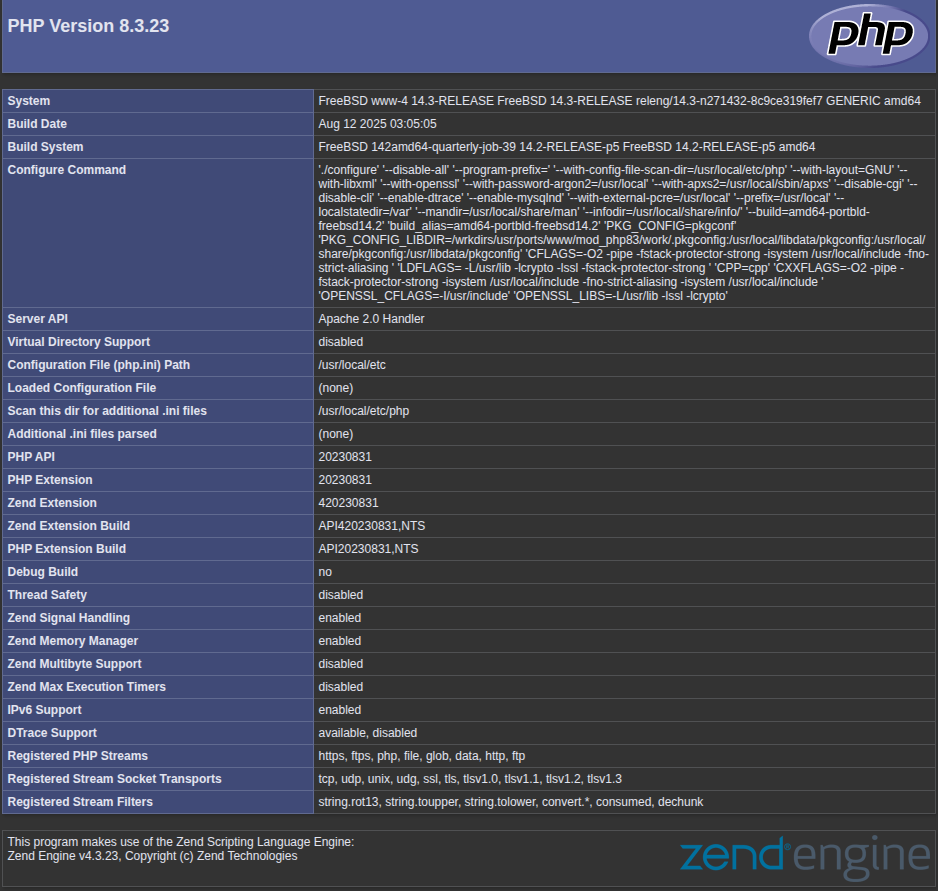
pb-data.ymlcreates the filedata/info.php.The playbook
pb-apache.ymlconfigures PHP in the Apache HTTP Server.
Requirements
Template
ansible-apachecreated in 209 Create iocage pkglist file.
Notes
TBD
Note
vbotka.freebsd.apache is the role apache in the collection vbotka.freebsd.
vbotka.freebsd_apache is the role freebsd_apache in the namespace vbotka.
ansible.cfg
[defaults]
callback_result_format = yaml
deprecation_warnings = False
display_skipped_hosts = False
gathering = explicit
interpreter_python = auto_silent
log_path = /var/log/ansible.log

[connection]
pipelining = true
Inventory iocage.ini
iocage_06

[iocage]
iocage_06

[iocage:vars]
ansible_user=admin
ansible_become=true
ansible_python_interpreter=auto_silent
hosts
hosts/06_iocage2.yml
plugin: vbotka.freebsd.iocage2
host: iocage_06
user: admin
get_properties: true
inventory_hostname_tag: alias
hooks_results:
  - /var/db/dhclient-hook.address.epair0b

compose:
  iocage_tags: dict(iocage_properties.notes | regex_findall('(\w+)=([\w\-]+)'))
  iocage_classes: iocage_properties.notes | regex_findall('(?<=class=)[\w\-]+|(?<=,)[\w\-]+')
# connection plugin vbotka.freebsd.jailexec
  ansible_connection: "'vbotka.freebsd.jailexec'"
  ansible_ssh_user: "'admin'"
  ansible_jail_host: dict(iocage_properties.notes | regex_findall('(\w+)=([\w\-]+)')).vmm | d('none')
  ansible_jail_name: iocage_jid
  ansible_jail_privilege_escalation: "'sudo'"
# ansible options
  ansible_python_interpreter: "'auto_silent'"

# For the default ssh connection use this dictionary
# compose:
#  iocage_tags: dict(iocage_properties.notes | regex_findall('(\w+)=([\w\-]+)'))
#  iocage_classes: iocage_properties.notes | regex_findall('(?<=class=)[\w\-]+|(?<=,)[\w\-]+')
#  ansible_host: (iocage_hooks.0 == '-') | ternary(iocage_ip4, iocage_hooks.0)
#  ansible_python_interpreter: "'auto_silent'"
hosts/99_constructed.yml
plugin: ansible.builtin.constructed

groups:
  www: "'http' in iocage_classes"
keyed_groups:
  - prefix: state
    key: iocage_state
  - prefix: vmm
    key: iocage_tags.vmm
host_vars
host_vars/iocage_06/apache.yml
properties:
  notes: vmm={{ inventory_hostname }} class=http
  bpf: 1
  dhcp: 1
  vnet: 1

create_hosts:
  www-4:
    template: ansible-apache
    properties:
      notes: alias=www_4
host_vars/www_4/apache.yml
apache_install: false
apache_confd: false
apache_servername: www-4
apache_serveradmin: admin@www-4

apache_httpd_conf_modules:
  - {module: php_module, mod: libphp.so}

apache_directory_blocks:
  - Directory: /usr/local/www/apache24/data/
    Includefile: usr-local-www-apache-data.conf
    Conf:
      - "DirectoryIndex index.php index.html index.htm"
      - "AddType application/x-httpd-php .php"
      - "AddType application/x-httpd-php-source .phps"
      - "Options Indexes FollowSymLinks"
      - "AllowOverride All"
      - "Require all granted"
Create and start jails
(env) > ansible-playbook -i iocage.ini \
                         -t create_host -e create_host=true \
                         vbotka.freebsd.pb_iocage_ansible_clients.yml
PLAY [Create and start jails. Optionally stop and destroy jails.] **************

TASK [Get pool.] ***************************************************************
ok: [iocage_06]

TASK [Create jails] ************************************************************
ok: [iocage_06] => (item=www-4 ansible-apache)

TASK [Start created hosts] *****************************************************
ok: [iocage_06]

PLAY RECAP *********************************************************************
iocage_06                  : ok=3    changed=0    unreachable=0    failed=0    skipped=9    rescued=0    ignored=0
Playbook pb-data.yml
- name: Create data/php.info for Apache HTTP Server.
  hosts: www_4

  tasks:

    - copy:
        src: info.php
        dest: /usr/local/www/apache24/data
Playbook output - Create data/info.php for Apache HTTP Server
(env) > ansible-playbook -i hosts pb-data.yml
PLAY [Create data/php.info for Apache HTTP Server.] ****************************

TASK [copy] ********************************************************************
changed: [www_4]

PLAY RECAP *********************************************************************
www_4                      : ok=1    changed=1    unreachable=0    failed=0    skipped=0    rescued=0    ignored=0
Graph
(env) > ansible-inventory -i hosts --graph
@all:
  |--@ungrouped:
  |--@state_up:
  |  |--repos
  |  |--www_1
  |  |--repos_devel
  |  |--pkg_repo
  |  |--log_server_01
  |  |--www_4
  |  |--www_3
  |--@vmm_iocage_06:
  |  |--repos
  |  |--www_1
  |  |--repos_devel
  |  |--pkg_repo
  |  |--log_server_01
  |  |--www_4
  |  |--www_3
  |--@www:
  |  |--www_1
  |  |--www_4
  |  |--www_3
Jails
shell> ssh admin@iocage_06 sudo iocage list -l
+-----+---------------+------+-------+------+-----------------+-----------------------+-----+------------------+----------+
| JID |     NAME      | BOOT | STATE | TYPE |     RELEASE     |          IP4          | IP6 |     TEMPLATE     | BASEJAIL |
+=====+===============+======+=======+======+=================+=======================+=====+==================+==========+
| 1   | log-server-01 | on   | up    | jail | 15.1-RELEASE-p1 | vnet0|172.16.99.10/24 | -   | ansible-init     | no       |
+-----+---------------+------+-------+------+-----------------+-----------------------+-----+------------------+----------+
| 2   | pkg-repo      | on   | up    | jail | 15.1-RELEASE-p1 | vnet0|172.16.99.23/24 | -   | ansible-pkg-repo | no       |
+-----+---------------+------+-------+------+-----------------+-----------------------+-----+------------------+----------+
| 3   | repos         | on   | up    | jail | 15.1-RELEASE-p1 | vnet0|172.16.99.21/24 | -   | ansible-repos    | no       |
+-----+---------------+------+-------+------+-----------------+-----------------------+-----+------------------+----------+
| 4   | repos-devel   | on   | up    | jail | 15.1-RELEASE-p1 | vnet0|172.16.99.22/24 | -   | ansible-repos    | no       |
+-----+---------------+------+-------+------+-----------------+-----------------------+-----+------------------+----------+
| 7   | www-1         | off  | up    | jail | 15.1-RELEASE-p1 | epair0b|172.16.99.180 | -   | ansible-apache   | no       |
+-----+---------------+------+-------+------+-----------------+-----------------------+-----+------------------+----------+
| 8   | www-3         | off  | up    | jail | 15.1-RELEASE-p1 | epair0b|172.16.99.120 | -   | ansible-apache   | no       |
+-----+---------------+------+-------+------+-----------------+-----------------------+-----+------------------+----------+
| 9   | www-4         | off  | up    | jail | 15.1-RELEASE-p1 | epair0b|172.16.99.142 | -   | ansible-apache   | no       |
+-----+---------------+------+-------+------+-----------------+-----------------------+-----+------------------+----------+
Playbook pb-apache.yml
- name: Configure and start Apache HTTP Server.
  hosts: www_4
  gather_facts: true

  roles:
    - vbotka.freebsd.apache
Playbook output - Configure and start server
(env) > ansible-playbook -i hosts pb-apache.yml
PLAY [Configure and start Apache HTTP Server.] *********************************

TASK [Gathering Facts] *********************************************************
ok: [www_4]

TASK [Vars: Include OS vars.] **************************************************
included: vbotka.freebsd.lib for www_4

TASK [vbotka.freebsd.lib : Al_include_os_vars_path: Vars from /scratch/collections/ansible_collections/vbotka/freebsd/roles/apache/vars/defaults] ***
ok: [www_4]

TASK [vbotka.freebsd.apache : Httpd-conf: Configure parameters in /usr/local/etc/apache24/httpd.conf] ***
changed: [www_4] => (item={'regexp': 'ServerName', 'line': 'www-4'})
changed: [www_4] => (item={'regexp': 'ServerAdmin', 'line': 'admin@www-4'})
changed: [www_4] => (item={'regexp': 'ServerTokens', 'line': 'Prod'})

TASK [vbotka.freebsd.apache : Httpd-dirs: Configure directories in /usr/local/etc/apache24/Includes/] ***
changed: [www_4] => (item=/usr/local/www/apache24/data/)

TASK [vbotka.freebsd.apache : Httpd-modules: Load modules in /usr/local/etc/apache24/httpd.conf] ***
changed: [www_4] => (item={'module': 'php_module', 'mod': 'libphp.so'})

TASK [vbotka.freebsd.apache : Rc-conf: Enable and Start Apache] ****************
changed: [www_4]

RUNNING HANDLER [vbotka.freebsd.apache : Enable and start vbotka.freebsd.apache] ***
changed: [www_4]

RUNNING HANDLER [vbotka.freebsd.apache : Restart vbotka.freebsd.apache] ********
changed: [www_4]

RUNNING HANDLER [vbotka.freebsd.apache : Reload vbotka.freebsd.apache] *********
ok: [www_4]

PLAY RECAP *********************************************************************
www_4                      : ok=10   changed=6    unreachable=0    failed=0    skipped=33   rescued=0    ignored=0
Results
Test the configuration:
[iocage_06]# iocage exec www-4 service apache24 configtest
Performing sanity check on apache24 configuration:
Syntax OK
In a browser, open the page
http://www-4/info.php. If the URL resolves, the content should look similar to the screenshot below.